


ZhanPeng
Lenovo Battery
Lenovo Battery
Couldn't load pickup availability


Lenovo Battery Replacement — ThinkPad T, X, P, L, E & Yoga Series
FRU-matched replacement Li-Ion battery with 12 variants from 60Wh to 99.9Wh. RapidCharge (80% in under 60 min), 500+ charge cycles, up to 11-hour runtime. Select your variant by matching the FRU P/N on your original battery label.
Product Overview
This FRU-matched Lenovo replacement battery restores full runtime to your ThinkPad T, X, P, L, E, or Yoga laptop. Available in 12 variants covering 6+ model generations, each variant matches a specific Lenovo FRU (Field Replacement Unit) part number for guaranteed voltage, capacity, physical fit, and communication compatibility.
Every variant supports Lenovo RapidCharge technology — from 0 to 80 percent in under 60 minutes with a compatible 65W or higher adapter. A 15-minute charge during a break gives you hours of productive runtime. The battery delivers up to 11 hours of mixed-use runtime on a ThinkPad T14s Gen 4 and is rated for 500+ charge cycles to 80 percent capacity with zero memory effect.
Built with original-spec lithium-ion or lithium-polymer cells and an integrated smart protection system, the battery guards against overcharge, over-discharge, overcurrent, short circuit, and thermal runaway. The SMBus-compatible BMS communicates correctly with the ThinkPad Embedded Controller and Lenovo Vantage for accurate health reporting, cycle count, and Conservation Mode support. Installation takes under 90 seconds.
Available Variants — Select by FRU P/N
Match your original battery's FRU P/N (printed on the battery label or visible in Lenovo Vantage) to a variant below. Voltage, capacity, and physical fit vary by model.
| Variant (Model) | Part Numbers / FRU | Specs |
|---|---|---|
| L23C4P72 | L23C4P72, SB11H56312, 5B11H56411, L23M4P71, L23C4P71, L23M4P70 | 15.44V, 5570mAh / 86Wh, Li-Ion — ThinkPad T16 Gen 3/4, P16s Gen 4 |
| L23D4PC3 | 5B11M75490, 5B11M75491, L23B4PC3, L23C4PC3, L23D4PC3, L23L4PC3, L23M4PC3, SB11M75492 | 15.56V, 6404mAh / 99.9Wh, Li-Polymer — Legion 16IRX9, Legion 7 16 IRX G9 |
| L19M4PC0 | L19M4PC0, L19C4PC0, L19L4PC0, L19SPC0 | 15.44V, 60Wh, Li-Ion — ThinkPad T Series |
| L22C4PC2 | L22C4PC2 | Li-Ion — ThinkPad / Yoga Series |
| L23N4PF1 | L23N4PF1 | Li-Ion — ThinkPad Series |
| L24X4PG7 | L24X4PG7 | Li-Ion — ThinkPad Series |
| L22C4PC0 | L22C4PC0 | Li-Ion — ThinkPad / Yoga Series |
| L22D4PC2 | L22D4PC2 | Li-Ion — ThinkPad Series |
| L20M4PDB | L20M4PDB | Li-Ion — ThinkPad Series |
| L19M4PDB | L19M4PDB | Li-Ion — ThinkPad Series |
| L23M4PG1 | L23M4PG1 | Li-Ion — ThinkPad Series |
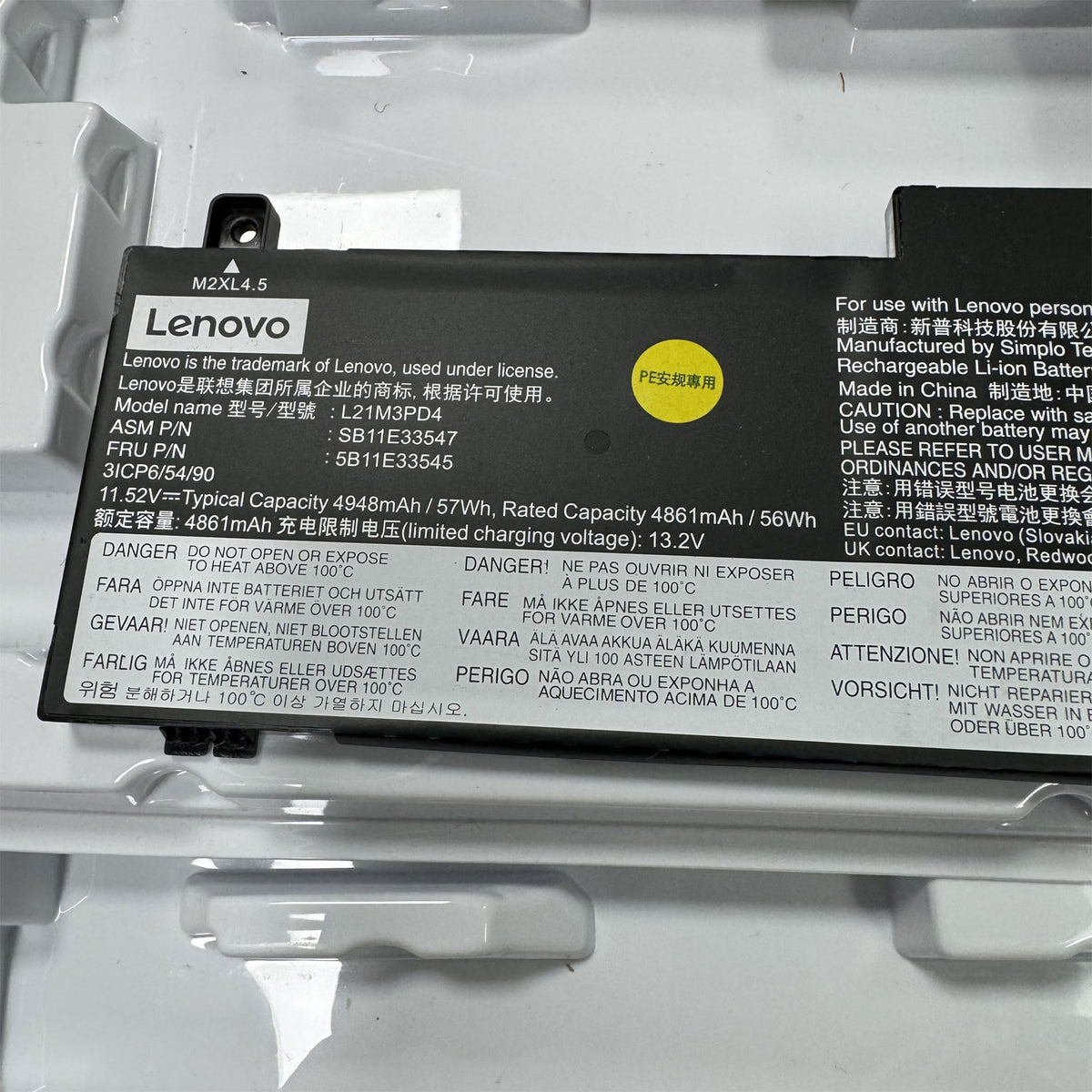
| L21M3PD4 | L21M3PD4 | Li-Ion — ThinkPad / Yoga Series |
Compatible Lenovo Laptop Series
These 12 battery variants cover the following Lenovo laptop series. Specific model compatibility depends on the variant selected.
ThinkPad Series
- ThinkPad T Series
- ThinkPad X Series
- ThinkPad P Series
- ThinkPad L Series
- ThinkPad E Series
Yoga & Legion
- ThinkPad Yoga
- Legion 7 / Legion 16IRX9
Key Features & Specifications
| Specification | Detail |
|---|---|
| Battery Type | Lithium-Ion (Li-Ion) / Lithium-Polymer (Li-Polymer) — varies by variant |
| Capacity Range | 60Wh to 99.9Wh across 12 variants |
| Voltage Range | 15.44V to 15.56V (varies by variant and cell configuration) |
| Condition | Original OEM specification — Brand New, rechargeable |
| RapidCharge | 0 to 80% in under 60 minutes (requires 65W+ adapter) |
| Runtime | Up to 11 hours mixed-use (ThinkPad T14s Gen 4 with 86Wh variant) |
| Cycle Life | 500+ charge cycles to 80% capacity — zero memory effect |
| Protection System | Overcharge, over-discharge, overcurrent, short circuit, thermal runaway |
| Communication | SMBus-compatible BMS — Lenovo Vantage health reporting, Conservation Mode |
| Installation Time | Under 90 seconds — external hot-swap or internal screw-mounted |
| Compatible Chargers | All Lenovo 65W+ USB-C and slim-tip AC adapters |
| Warranty | 12 months (1 year) replacement warranty |
How to Find Your Battery FRU P/N — 3 Methods
Method 1: Check Your Original Battery Label
Remove the battery (or open the bottom cover for internal packs). Look at the label for the FRU P/N field. Example: FRU 5B11H56411. This is the most reliable identifier. Match it to the variant table above.
Method 2: Use Lenovo Vantage
Open Lenovo Vantage. Go to Device, then Power, then Battery Details. The FRU number, cycle count, and health percentage are all displayed.
Method 3: Lenovo Parts Lookup
Visit support.lenovo.com/partslookup. Enter your laptop's Machine Type (MT) and Serial Number (S/N) from the bottom label. The system lists all compatible battery FRU numbers for your exact machine.
Why Choose This Lenovo Replacement Battery
FRU-Matched Precision
12 variants keyed to specific Lenovo FRU part numbers. No guessing, no "universal fit" claims. Match your FRU P/N for guaranteed voltage, capacity, connector, and physical fit.
RapidCharge: 80% in Under 60 Min
Go from empty to 80 percent during a lunch break or airport layover. Compatible with Lenovo 65W+ USB-C and slim-tip adapters. No special charger needed.
Up to 11 Hours Runtime
86Wh variant delivers up to 11 hours of mixed-use productivity on a ThinkPad T14s Gen 4. 99.9Wh variant provides even longer for Legion gaming sessions.
500+ Charge Cycles
Rated for 500+ full charge-discharge cycles before capacity drops to 80 percent. Zero memory effect — charge at any level without degrading capacity.
Smart Protection System
Integrated BMS guards against overcharge, over-discharge, overcurrent, short circuit, and thermal runaway. SMBus communication with Lenovo Vantage for real-time health monitoring.
90-Second Installation
External batteries: slide the latch, swap, click. Internal batteries: remove bottom cover, disconnect old, connect new. Use BIOS "Disable Internal Battery" option for added safety.
Frequently Asked Questions
Q: How do I choose the correct Lenovo battery variant from the 12 options?
A: Match the FRU P/N printed on your original battery label to one of the 12 variants in the selector. The FRU P/N is the most reliable identifier — it ensures exact voltage, capacity, physical dimensions, and connector compatibility. You can find your FRU by checking the label on your existing battery, opening Lenovo Vantage under Device then Power then Battery Details, or visiting support.lenovo.com/partslookup with your Machine Type and Serial Number.
Q: How long does this Lenovo replacement battery last on a single charge?
A: Runtime varies by variant capacity and usage. On a ThinkPad T14s Gen 4, this battery delivers up to 11 hours of mixed-use runtime. Higher watt-hour variants (86Wh, 99.9Wh) provide the longest runtime. Actual results depend on screen brightness, running applications, wireless activity, and power settings. RapidCharge technology delivers 80 percent charge in under 60 minutes with a compatible 65W or higher adapter.
Q: What is Lenovo RapidCharge and how fast does it charge?
A: Lenovo RapidCharge charges the battery from 0 to 80 percent in under 60 minutes using a 65W or higher USB-C or slim-tip AC adapter. A 15 to 20 minute charge during a break provides several hours of usable runtime. RapidCharge works across ThinkPad T, X, and Yoga series and does not require special settings — simply connect the charger and the battery management system handles the fast-charge cycle automatically.
Q: How many charge cycles does this Lenovo battery last?
A: This battery is rated for 500 or more charge cycles before capacity drops to 80 percent of its original rating. A charge cycle equals one full discharge and recharge. Partial discharges count proportionally. With typical daily use, this translates to approximately 1.5 to 3 years of service. Use Lenovo Vantage Conservation Mode (caps charging at 55-60 percent) if your laptop stays plugged in most of the time — this significantly extends the battery's lifespan.
Q: Which Lenovo models are NOT compatible with the batteries in this listing?
A: This listing covers 12 specific FRU-matched variants for ThinkPad T, X, P, L, E, and Yoga series laptops spanning 6 or more generations. Batteries from different generations are not interchangeable even if they look similar. A variant for ThinkPad T16 Gen 3 will not fit a ThinkPad T16 Gen 2. A Legion 16IRX9 variant will not fit a ThinkPad. Always cross-check your FRU number. If your exact FRU is not among the 12 variants listed, contact us for assistance.
Q: What safety protections does this replacement battery include?
A: This battery includes a built-in smart protection system with safeguards against overcharge, over-discharge, overcurrent, short circuit, and thermal runaway. The battery management system (BMS) communicates with the ThinkPad Embedded Controller via SMBus protocol, enabling Lenovo Vantage to monitor battery health, cycle count, and temperature. The battery holds IEC 62133 and UN 38.3 safety certifications.
Q: How do I install the replacement battery in my Lenovo ThinkPad?
A: Replacement takes under 90 seconds for most ThinkPad models. For external (hot-swappable) batteries: slide the latch, remove the old battery, click in the new one. For internal batteries: power off the laptop, remove the bottom cover screws, disconnect the old battery connector, remove it, connect the new battery, and reassemble. Use Lenovo Vantage or the BIOS option to disable the internal battery before disconnecting it for added safety. Always charge the new battery fully before first use.
What's Included
- 1 x Lenovo Replacement Battery — select your variant by FRU P/N
- 1 x Installation Guide
Summary
| Variants | 12 — L23C4P72, L23D4PC3, L19M4PC0, L22C4PC2, L23N4PF1, L24X4PG7, L22C4PC0, L22D4PC2, L20M4PDB, L19M4PDB, L23M4PG1, L21M3PD4 |
| Capacity Range | 60Wh to 99.9Wh |
| Battery Type | Li-Ion / Li-Polymer (varies by variant) |
| RapidCharge | 0 to 80% in under 60 minutes (65W+ adapter required) |
| Cycle Life | 500+ cycles to 80% capacity |
| Protection | Overcharge, over-discharge, overcurrent, short circuit, thermal runaway |
| Compatible Series | ThinkPad T, X, P, L, E, Yoga, Legion — 6+ generations |
| Selection Method | Match FRU P/N on original battery label — do not order by model name alone |