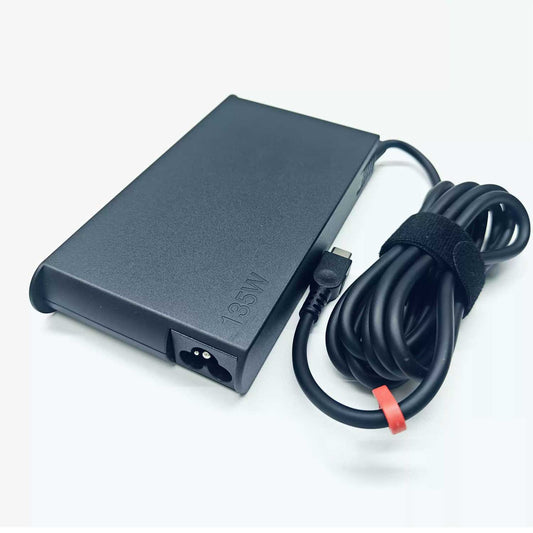
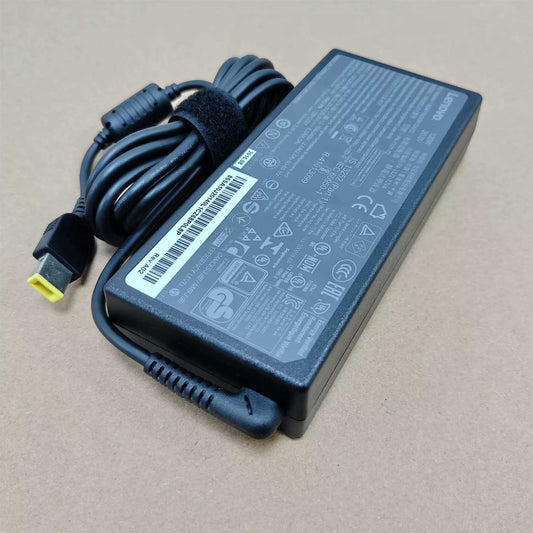
Looking for a replacement Lenovo ThinkPad charger? This lot will help you find the right power adapters for the range of ThinkPads used in the business world, for remote working, for travel and for the general running of your day to day work. You might be in the position of needing to replace a charger you've lost, a charger with a damaged cable, or a power supply that simply won't charge your laptop any more. In which case you'll need to work out your ThinkPad model and check the original adapter spec.
ThinkPad chargers aren't all the same. Depending on the generation of the laptop and its configuration it may use USB-C charging, a Lenovo Slim Tip connector or some other specific power input. The correct replacement will be one that matches the laptop's charging method, voltage, power requirements and connector type.
Shop Lenovo ThinkPad Replacement Chargers
Use the product links below to organize your search by charger type and power rating. These example links are placeholders and must be replaced with actual products from your store before publication.
Lenovo ThinkPad 45W USB-C Charger
Explore a compact USB-C power adapter for ThinkPad models that support a compatible 45W charging profile. Confirm the required output and laptop compatibility before ordering.
View ThinkPad 45W USB-C Charger
Lenovo ThinkPad 65W USB-C Charger
Find a 65W USB-C replacement option for compatible ThinkPad laptops. Compare the adapter's voltage and current profiles with the laptop's specified USB-C Power Delivery requirements.
View ThinkPad 65W USB-C Charger
Lenovo ThinkPad 135W Power Adapter
Compare 135W replacement adapters for compatible ThinkPad models. Verify the connector type and electrical specifications instead of relying on the wattage rating alone.
View ThinkPad 135W Power Adapter
Find a Charger for Your ThinkPad Series
ThinkPad X Series
ThinkPad X Series laptops are designed for mobile productivity, but their charging requirements vary by model and generation. Before replacing an adapter, check whether your laptop supports USB-C charging and confirm the recommended power rating.
ThinkPad T Series
ThinkPad T Series models are commonly used for office work and business computing. A suitable replacement charger depends on the exact T Series model, its supported input method, and its required adapter output. Use the full model number to narrow down compatible products.
ThinkPad L and E Series
ThinkPad L and E Series laptops have different configurations across generations. Do not assume that all models within either series use the same charger. Check the original adapter label or the manufacturer's specifications before selecting a replacement.
ThinkPad P Series Mobile Workstations
ThinkPad P Series mobile workstations may have higher power demands than standard business laptops. Depending on the model, a standard USB-C charger may not provide the required power for all operating conditions. Verify the specified adapter wattage and charging method before ordering.
USB-C vs. Slim Tip ThinkPad Chargers
ThinkPad laptops can use different charging connectors, so identifying the correct connection is an essential step when replacing a charger.
-
USB-C chargers: Suitable for ThinkPad models that support charging through USB-C and accept the adapter's supported Power Delivery output.
-
Slim Tip chargers: Designed for compatible Lenovo laptops that use the rectangular Slim Tip power connector.
A USB-C port does not automatically mean the laptop supports USB-C charging, and a Slim Tip adapter is not a direct substitute for a USB-C charger. Confirm the supported charging method for your specific ThinkPad.
Shop Lenovo USB-C Chargers or browse Lenovo Slim Tip Chargers to explore the relevant connector categories.
How to Choose the Right ThinkPad Charger
Identify the Full ThinkPad Model
Use the complete model name or machine type shown on the laptop, its label, or its system information. A family name such as ThinkPad T Series or X Series is not enough to establish compatibility because specifications can vary between generations and configurations.
Match the Original Adapter Part Number
Check the model or part number printed on the original charger. Compare it with the replacement product listing and look for an explicit compatibility match. If the original adapter is unavailable, use the laptop's exact model and official power requirements to identify a suitable replacement.
Check Voltage and Wattage
Confirm that the replacement provides the voltage required by the laptop and sufficient supported power. A charger with a higher wattage is not automatically compatible, and an underpowered adapter may charge slowly or fail to meet the laptop's needs during operation.
Verify the Connector and USB-C Power Delivery
For USB-C models, compare the supported voltage and current profiles with the laptop's requirements. For Slim Tip models, verify the physical connector and electrical specifications. Connector appearance alone is not sufficient to confirm compatibility.
Check Whether a Power Cord Is Included
Package contents differ by product. Review the listing to see whether the AC power cord is included, whether the adapter is sold separately, and what accessories are supplied.
Frequently Asked Questions About Lenovo ThinkPad Chargers
Which charger do I need for my Lenovo ThinkPad?
The correct charger depends on your exact ThinkPad model, supported charging method, required voltage, wattage, and connector. Check the original adapter's specifications or consult the manufacturer's documentation before purchasing a replacement.
Can I use a Lenovo USB-C charger with my ThinkPad?
Yes, if your specific ThinkPad supports USB-C charging and the charger provides a compatible Power Delivery output with sufficient power. Verify the model specifications and adapter output before use.
Do all ThinkPad laptops use the same charger?
No. Different ThinkPad generations and series can require different charging connectors and power ratings. Always verify the exact model and charger specifications rather than assuming that an adapter for one ThinkPad will work with another.
Is a 65W charger enough for a ThinkPad?
A 65W charger may be suitable for some ThinkPad models, but other models may require a different power rating. Check the laptop's official specifications or original adapter label to determine the required wattage and charging profile.
Can I use a higher-wattage charger with my ThinkPad?
A higher-wattage adapter may be suitable when its voltage, connector, and charging specifications meet the laptop's requirements. Wattage alone does not guarantee compatibility, so verify the adapter against the exact model specifications.
Why is my ThinkPad not charging with a replacement adapter?
Possible causes include an incompatible connector, an unsupported USB-C Power Delivery profile, insufficient power output, a damaged cable, or a problem with the laptop's charging port. Check the adapter specifications and cable condition, and consult a qualified technician if the issue persists.
How do I find a compatible replacement using the adapter part number?
Read the part number from the original adapter label and compare it with the replacement listing. Also confirm the laptop model, output voltage, wattage, and connector type before placing an order.
Shop Lenovo ThinkPad Replacement Power Adapters
Browse the available ThinkPad chargers and compare the listed specifications with your laptop's requirements. Confirm the full model number, adapter part number, power rating, and connector type before ordering to reduce the risk of selecting an incompatible charger.
Explore more Lenovo charging options: