


ZhanPeng
Chicony A12-230P1A 230W AC Adapter Charger
Chicony A12-230P1A 230W AC Adapter Charger
Couldn't load pickup availability


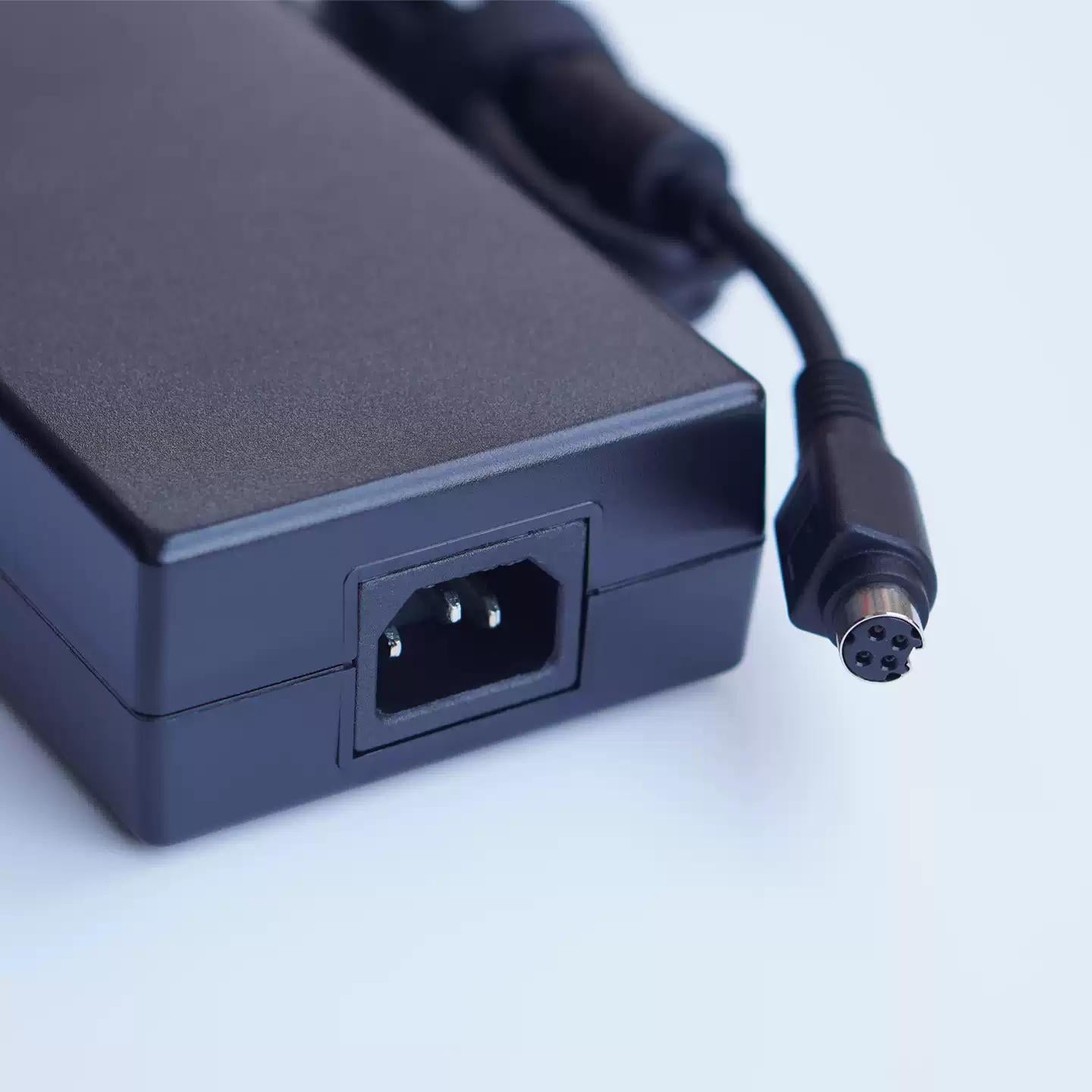
Chicony A12-230P1A 230W Adapter: What It Is and How to Buy the Right One
A 19.5V / 11.8A, 4-pin OEM power supply for high-draw gaming laptops and mobile workstations — and the three numbers you must match before you order.
If your gaming laptop suddenly refuses to charge under load, throttles its GPU, or shows a "slow charger detected" warning, the problem is often the adapter rather than the machine. The Chicony A12-230P1A is a 230-watt OEM brick built for systems that genuinely need that much power. This guide explains what it delivers, why the rating has to match exactly, and how to confirm it fits your laptop before you spend money.
The short version of the spec
Every laptop adapter is defined by three figures and one physical plug. Get all four right and it works; get one wrong and it either won't fit, won't charge, or could damage the system.
| Brand / Model | Chicony A12-230P1A |
|---|---|
| Output voltage | 19.5V DC |
| Output current | 11.8A |
| Total power | 230W (19.5 × 11.8) |
| Input | AC 100–240V, 50/60Hz (worldwide) |
| Connector | 4-pin laptop barrel/proprietary plug |
| Condition | New, original OEM |
Why the wattage has to match — not just "be close"
A 230W brick exists because the laptop it ships with can draw close to that under a combined CPU + GPU load. Substitute a lower-wattage adapter and a few things happen: the laptop caps performance to stay within the power budget, the battery drains while plugged in during gaming, and the under-rated adapter runs hot. So while a 180W or 200W unit may physically plug in, it can't sustain the machine.
The voltage is the non-negotiable part. 19.5V is fixed — the laptop's charging circuit expects it. A higher voltage risks damaging the board; a lower one usually means no charge at all. Current (amperage) is a ceiling, not a target: an adapter rated for more amps at the same voltage is generally safe, but going below the original 11.8A is what causes the throttling above.
19.5V + ≥230W + correct 4-pin plug = a safe replacement.The 4-pin connector catches people out
High-wattage laptops often use a proprietary multi-pin connector rather than a simple round barrel, because the extra pins carry the higher current safely and let the laptop "read" the adapter's wattage. The A12-230P1A uses a 4-pin plug. A correct-wattage adapter with the wrong connector shape is useless, so the plug is just as important as the numbers — confirm it visually, not only on paper.
Which laptops use it
The A12-230P1A appears across performance notebooks that share the same 230W power envelope, including select models in these families:
- MSI gaming series
- Clevo barebones and their rebrands
- Sager gaming notebooks
- Acer Predator series
- Other machines that specify a 19.5V / 11.8A / 230W supply with a matching 4-pin plug
Brand series names are a starting point, not a guarantee — the same chassis ships with different power requirements across configurations.
Before you order: a 60-second compatibility check
- Read the label on your current adapter. Confirm it says
19.5Vand11.8A(or the 230W total). - Check the model string — ideally it reads
A12-230P1A, but any genuine 230W / 19.5V brick with the same plug is a candidate. - Compare the connector physically: count the pins and match the plug shape and size to your laptop's port.
- Confirm the input range covers your region —
100–240Vworks globally, so travel isn't an issue. - If the original was lost, look up your laptop's exact model number in its manual or manufacturer spec sheet to confirm the required wattage.
When it's worth replacing
Replace the adapter — rather than the laptop — when you see intermittent charging, a frayed or kinked cable, a brick that gets uncomfortably hot, a loose plug, or charging that only works at certain angles. A clean OEM-spec replacement restores full charging current and lets the laptop run at its rated performance again. Buying a spare for a second location (office, travel bag) is also cheaper than carrying one brick back and forth and wearing out its cable.
This is a third-party replacement product sold by ZhanPeng, operated by Changsha Liping Technology Co., Ltd. It is not manufactured by or affiliated with the original device manufacturer. All brand names, model numbers, and trademarks referenced are the property of their respective owners and are used solely to indicate product compatibility. ZhanPeng is an independent retailer and is not sponsored, authorized, or otherwise connected with the original equipment manufacturer.