


ZhanPeng
Genuine RH03XL Battery for HP ProBook 430 440 445 450 455 630 640 650 G8 G9 G10
Genuine RH03XL Battery for HP ProBook 430 440 445 450 455 630 640 650 G8 G9 G10
Couldn't load pickup availability


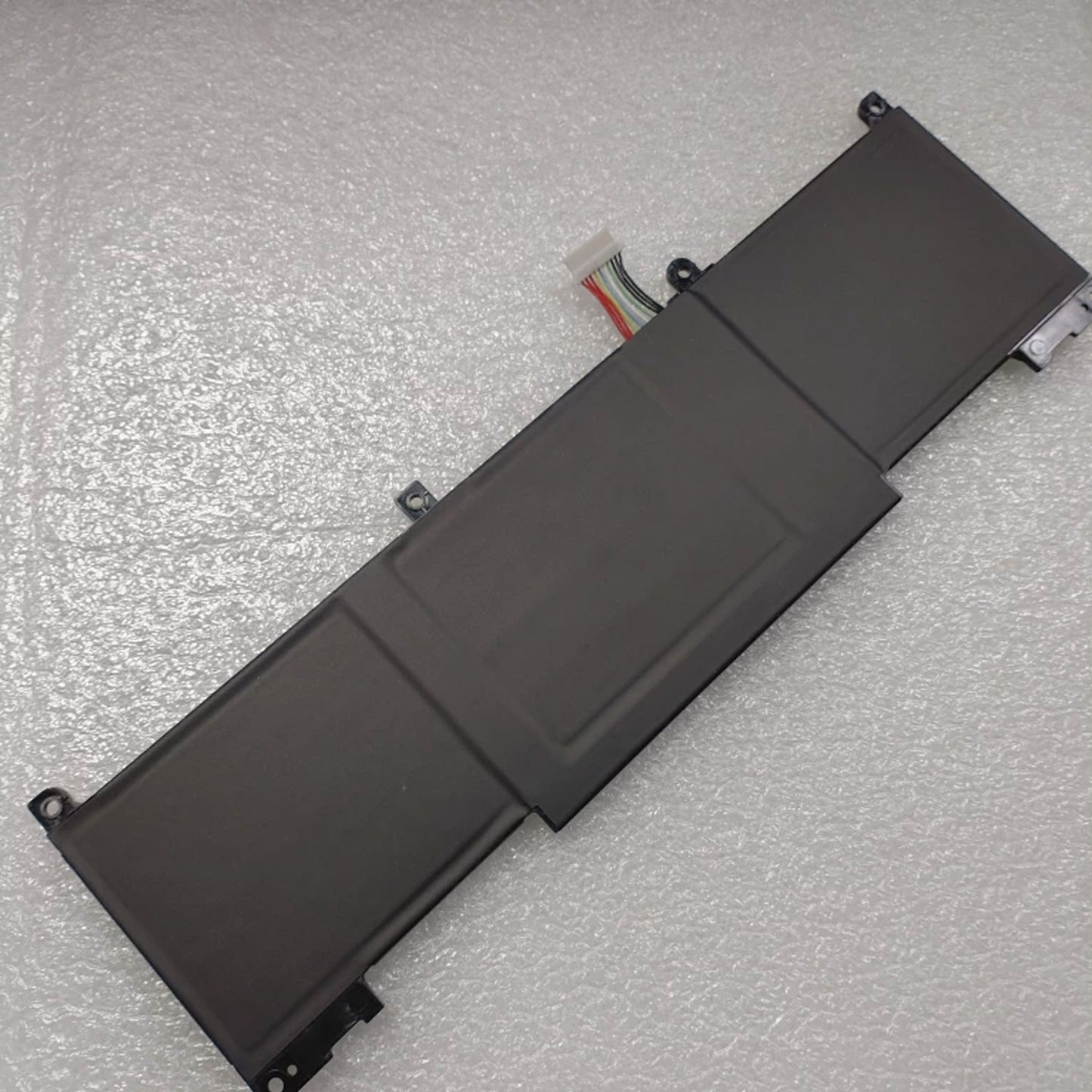
Genuine RH03XL Battery for HP ProBook 430 440 445 450 455 630 640 650 G8 G9 G10 — 11.4V 42.75Wh
Genuine RH03XL replacement 3-cell Li-Ion battery for HP ProBook 400 and 600 G8/G9/G10 series. 11.4V, 42.75Wh. Up to 10 hours web browsing. Step-by-step installation guide included. Replaces 18+ HP part numbers. 1-year warranty.
Product Overview
This genuine RH03XL replacement battery restores full business-day mobility to your HP ProBook or Zhan 66 Pro. Delivering 11.4V with a 42.75Wh capacity, this 3-cell lithium-ion pack powers up to 10 hours of web browsing and 8 hours of video playback — matching HP's official benchmark for the ProBook 450 G8.
The battery replaces 18+ HP part numbers: RH03XL, HSTNN-OB1T, HSTNN-DB0B, HSTNN-IB9P, HSTNN-IB9Q, HSTNN-UB7X, M01524-171, M01524-541, M01524-2B1, M01524-2C1, M01524-2C2, M01524-1D1, M01524-AC1, M02027-005, and more. Fits ProBook 430/440/445/450/455 G8/G9/G10 and ProBook 630/640/650 G8/G9 plus Zhan 66 Pro 14 G4 series.
Supports HP Fast Charge via 45W/65W USB-C — full charge in about 2 hours. Rated for 500+ cycles. Includes a detailed step-by-step installation guide below. Covered by a 1-year warranty.
Replaces These HP Battery Part Numbers
| Part Number | Type |
|---|---|
| RH03XL / RHO3XL / RH03 / RHO3 | Primary battery model codes — direct replacement |
| HSTNN-OB1T / HSTNN-DB0B / HSTNN-IB9P / HSTNN-IB9Q / HSTNN-UB7X | HP internal battery identification codes |
| M02027-005 | Primary HP spare part number |
| M01524-171 / M01524-541 / M01524-2B1 / M01524-2C1 / M01524-2C2 / M01524-1D1 / M01524-AC1 | HP spare part number variants |
| HSN-Q28C-4 / HSN-Q27C / HSN-Q27C-5 / TPN-DB0B | TPN model designations — same battery |
Key Specifications
| Specification | Detail |
|---|---|
| Battery Model | RH03XL |
| Chemistry | Lithium-Ion (Li-Ion) / Li-Polymer |
| Voltage | 11.4V |
| Capacity | 42.75Wh / ~3790mAh — 3-cell |
| Color | Black |
| Condition | Brand New — Genuine | Well packed in exquisite box |
| Runtime (Web) | Up to 10 hours (ProBook 450 G8 benchmark) |
| Runtime (Video) | ~8 hours |
| Fast Charge | Yes — 42.75W/65W USB-C PD, full charge ~2 hrs |
| Cycle Life | 500-1000+ charge/discharge cycles |
| Compatible Models | ProBook 430/440/445/450/455 G8/G9/G10, 630/640/650 G8/G9, Zhan 66 Pro 14 G4 |
How to Install — Step-by-Step Guide
Tools needed: Phillips P1 (or PH0) screwdriver, plastic pry tool. Estimated time: 15-20 minutes.
Step 1: Shut Down and Discharge
Shut down the laptop completely. Unplug the AC adapter and all peripherals. Hold the power button for 10-15 seconds to discharge residual power from the motherboard. This is a critical safety step — skip it and you risk shorting the board during the swap.
Step 2: Remove the Bottom Cover
Flip the laptop over. There are 5 screws on the bottom cover: 3 captive Phillips screws that stay attached to the cover (just loosen them — do not force them out) and 2 removable Phillips M2.0×4.0 screws that you take out completely. Starting near the hinges, insert a plastic pry tool between the cover and chassis, then gently work around all four edges to release the clips. Lift the bottom cover off.
Step 3: Disconnect and Remove the Old Battery
Locate the battery — the large black rectangular component. Disconnect the battery cable from the system board first by gently pulling the connector straight out (pull by the plastic plug housing, never by the wires). Remove the 6 Phillips M2.0×4.0 screws securing the battery. Lift the old battery out. Press and hold the power button for 10 seconds again to drain any remaining static charge before installing the new battery.
Step 4: Install the New RH03XL Battery
Place the new RH03XL battery into the compartment, aligning it with the screw holes. Reconnect the battery cable to the system board — ensure it is firmly and squarely seated. Do not force it. Secure the battery with the 6 screws (do not overtighten — you could crack the mounting points).
Step 5: Reassemble and Charge
Align the bottom cover and press around all edges until all clips snap into place. Tighten the 3 captive screws, then replace the 2 removable screws. Plug in the AC adapter and power on. Verify Windows recognizes the battery and shows "plugged in, charging." Charge fully to 100% before first use. The battery may need 2-3 full charge/discharge cycles to reach peak performance and for the gauge to calibrate accurately.
Why Choose This RH03XL Battery
Up to 10-Hour Web Browsing
42.75Wh delivers ~10 hours of web browsing and ~8 hours of video on ProBook 450 G8 (LaptopMedia benchmark). All-day business productivity on a single charge.
HP Fast Charge via USB-C
0 to 100% in approximately 2 hours with a 45W or 65W USB-C PD charger. Rapid top-ups during meetings or between flights.
Replaces 18+ HP Part Numbers
One battery covers RH03XL, HSTNN-OB1T, HSTNN-DB0B, M02027-005, M01524-AC1 and 13+ more. Match your label to confirm.
Broad ProBook Compatibility
Fits ProBook 400 and 600 series from G8 through G10 — plus Zhan 66 Pro 14 G4. One battery model for your entire fleet.
500-1000+ Cycle Life
Genuine Li-Ion cells rated for 500-1000+ cycles. Proper care (keep 20-80%, avoid deep discharge) extends lifespan to 3+ years.
1-Year Replacement Warranty
Covered by a full 1-year warranty. Premature capacity loss, charging failure, or any defect — replaced at no cost within 12 months.
Frequently Asked Questions
Q: How long does the RH03XL 42.75Wh battery last on a single charge?
A: Benchmarked on a ProBook 450 G8: ~9 hours 40 minutes of web browsing and ~8 hours of video playback (LaptopMedia test, 120 nits brightness). Real-world mixed office use typically yields 5-8 hours. CPU-intensive tasks, high brightness, and video calls reduce runtime to 2-5 hours. HP advertises up to 12.5 hours under ideal conditions. For maximum runtime, use Windows Battery Saver mode and lower screen brightness.
Q: How do I install the RH03XL in my HP ProBook?
A: See the full step-by-step installation guide above. Quick summary: 1) Shut down, hold power button 15 seconds. 2) Remove 5 bottom screws (3 captive, 2 removable). 3) Pry off bottom cover. 4) Disconnect old battery cable, remove 6 screws, lift out old battery. 5) Press power button 10 seconds to drain static. 6) Place new RH03XL, reconnect cable, secure 6 screws. 7) Snap bottom cover back, replace screws. 8) Charge to 100%. Takes 15-20 minutes with a Phillips P1 screwdriver and plastic pry tool.
Q: How long does it take to fully charge the RH03XL battery?
A: Approximately 2 hours using a 45W or 65W USB-C PD charger. The ProBook G8/G9/G10 series supports HP Fast Charge via USB-C. A 30-minute charge during a break provides several hours of usable runtime. For best calibration, charge to 100% before first use — the battery meter may need 2-3 full cycles to report accurate percentages.
Q: Which ProBook models are NOT compatible with the RH03XL?
A: This battery fits ProBook 430/440/445/450/455 G8/G9/G10, 630/640/650 G8/G9, and Zhan 66 Pro 14 G4. It does NOT fit older ProBook G7 or earlier models, ProBook 400/600 G7 series, ProBook x360 models, HP EliteBook, HP Pavilion, HP Envy, or HP OMEN. Also note: some G9/G10 models use a slightly longer battery variant — always verify the code on your original label (RH03XL or one of the part numbers listed above).
Q: What HP part numbers does the RH03XL battery replace?
A: 18+ HP part numbers: RH03XL, RHO3XL, RH03, RHO3, HSTNN-OB1T, HSTNN-DB0B, HSTNN-IB9P, HSTNN-IB9Q, HSTNN-UB7X, M01524-171, M01524-541, M01524-2B1, M01524-2C1, M01524-2C2, M01524-1D1, M01524-AC1, M02027-005, HSN-Q28C-4, HSN-Q27C, HSN-Q27C-5, TPN-DB0B. Any of these on your original battery label confirms compatibility.
Q: How can I extend the lifespan of my ProBook battery?
A: 1) Keep the battery between 20-80% for daily use — avoid frequent full discharges. 2) If mostly plugged in, enable HP Adaptive Battery Optimizer in BIOS to cap charge at 80%. 3) Store at ~40% if unused for weeks. 4) Avoid high heat — do not leave the laptop in a hot car. 5) Run a full discharge-recharge cycle once a month to keep the battery gauge calibrated. With proper care, the RH03XL reaches 500-1000+ cycles (3-5 years of typical business use).
Q: Does this battery support the HP Fast Charge in my ProBook?
A: Yes. The RH03XL battery fully supports HP Fast Charge via USB-C Power Delivery on ProBook G8/G9/G10 models. With a 45W or 65W USB-C charger, the battery reaches 50% in approximately 45 minutes and a full charge in about 2 hours. The battery management system communicates with the charger to optimize the charging rate. The charging speed is the same as the original HP OEM battery.
Summary
| Battery Model | RH03XL |
| Voltage / Capacity | 11.4V / 42.75Wh / ~3790mAh — 3-cell Li-Ion |
| Runtime | ~10 hrs web browsing; ~8 hrs video; 5-8 hrs mixed office |
| Fast Charge | Yes — 45W/65W USB-C PD, full charge ~2 hrs |
| HP Part Numbers | 18+ — RH03XL, HSTNN-OB1T, M02027-005, M01524-AC1 and more |
| Compatible Models | ProBook 430/440/445/450/455 G8/G9/G10, 630/640/650 G8/G9, Zhan 66 Pro 14 G4 |
This is a third-party replacement product sold by ZhanPeng, operated by Changsha Liping Technology Co., Ltd. It is not manufactured by or affiliated with the original device manufacturer. All brand names, model numbers, and trademarks referenced are the property of their respective owners and are used solely to indicate product compatibility. ZhanPeng is an independent retailer and is not sponsored, authorized, or otherwise connected with the original equipment manufacturer.